AiPBX
Call Normalization & Ingress Dialplan Rules
Call Normalization rules act as an intelligent pre-filter between subscriber endpoints and the PBX Outbound Routes.
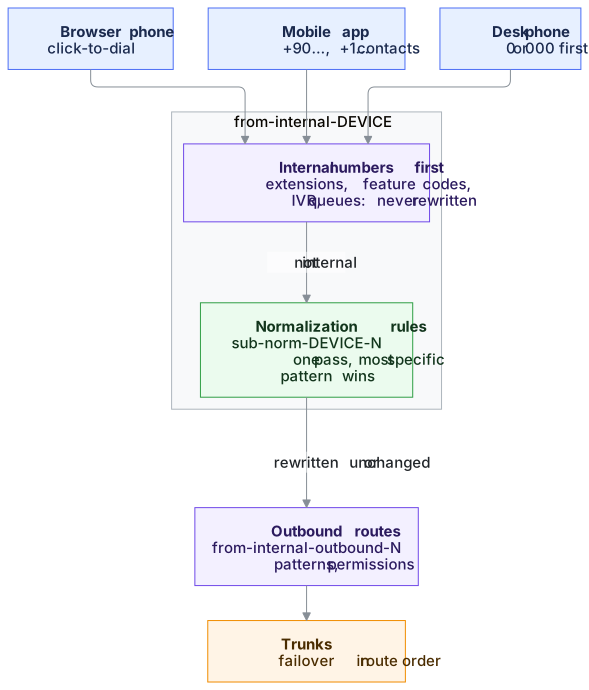
Why Separate Device Rules?
Different devices originate calls with completely different user habits:
- Desk Phones (
desktop/sip): Users frequently dial a trunk access prefix (0in Europe/Turkey,9in North America) before dialing an outside number (00537...or91212...). - Mobile App (
mobile/mob-webrtc): Users tap contacts stored in their address book in full E.164 (+90...,+1...,+49...) or 10-digit national format (537...). Mobile users never enter an outside trunk code. - Web Softphone (
web/webrtc): Browser-based agent softphone and CRM click-to-dial calls.
Without ingress normalization, supporting both desk phones and mobile apps required duplicated or conflicting outbound routes. With normalization rules, the dialed string is shaped into a standard format first.
Safe Asterisk Dialplan Hierarchy
To guarantee that call centers, queues, faxes and IVRs are never disrupted:
- Internal Extensions & Features: Evaluated first (
from-internal-pbx-ortak,featurecodes-pbx). Numbers like101,1002,*97(Voicemail),7000(IVR) never reach normalization rules. - Ingress Sub-Contexts: Slices are applied only to calls leaving the PBX:
from-internal-desktop→ includessub-norm-desktop-Nfrom-internal-mobile→ includessub-norm-mobile-Nfrom-internal-web→ includessub-norm-web-N
- Single-Pass Ingress Pre-Filter & Loop Circuit Breaker: Normalization operates as a single-pass pre-filter: once a rule matches and transforms the number, Asterisk routes directly to
from-internal-outbound-N. A defense-in-depth hop guard (__AIPBX_NORM_COUNT > 3) acts as a fail-safe circuit breaker, guaranteeing that external dialplan loops or macro re-entrancy can never cause infinite recursion.
Defaults and Rule Order
- Desk phone “strip the outside-line 0” rule is off by default. AiPBX’s international format is
00+ country code, so with this rule0049...would become049.... Switch it on only when your desk phone users dial0for an outside line. Faxes and call forwarding also use the desk phone rules. - Country-specific rules (e.g. Turkey:
+90→0,5XXXXXXXXX→05XXXXXXXXX) are loaded with Load defaults for the selected country. An upgrade switches them off on installations that are not set up for that country. - Order: when several rules match, Asterisk picks the most specific pattern (
_+90.beats_+X.), not the row order. The simulator shows the rule that really applies.
Live Normalization Simulator
On the Trunks → Call Normalization (/dialplan-rules) page, the interactive simulator lets administrators input any test number (e.g. +905379902352 or 005379902352), select the target device type, and inspect the real-time pattern match and resulting number.